The Best Mini PCs to Buy in 2026: A Guide for Every Use Case
Last updated: May 29, 2026
Disclosure: We may earn a commission from links on this page.
The rapid evolution of consumer mini PCs has fundamentally redefined the limits of what a small form factor PC can achieve. When searching for the best mini PC 2026 has to offer, buyers will find that these modern mini desktop computers have transcended their history of low-overhead web browsing. Today, they leverage architectural advancements in mobile-class system-on-chip (SoC) platforms and high-speed unified memory architectures to compete directly with traditional mid-to-high-end desktop towers. Whether you need a compact gaming PC for demanding workloads or a reliable budget mini PC for everyday tasks, the latest hardware delivers uncompromising performance across all categories.
Asus ROG NUC (2025 Edition)
"The premier ultra-compact desktop replacement for 1440p and 4K gaming, despite the noticeable fan noise."
SFF gaming rigs have struggled with thermal constraints for years, but the 2025 ROG NUC is the first 'puck' replacement that actually breathes. Switching to a vertical router-style chassis was a genius move for thermals, and despite the integrated stand, this machine is a powerhouse.
Under the hood sits an Intel Core Ultra 9 275HX paired with an Nvidia RTX 5080 Laptop GPU (16GB GDDR7). Testing shows it hitting a massive 20,751 in 3DMark Time Spy and 5,256 in the Vulkan-based Steel Nomad benchmark. It's effectively a mid-range desktop tower shoved into a quarter of the space.
Running Cyberpunk 2077 at native 1440p doesn't break a sweat, locking in at 60 FPS. For 4K panels, DLSS is a necessity—but it will outpace a PS5 without blinking. A word of warning: those fans aren't subtle. There's a noticeable hiss at idle that ramps up to a full-on whistle when pushing frames.
SFF gaming has always been a battle against physics, and Asus is finally winning. For context, the previous-generation Asus ROG NUC 970 ($1,399, RTX 4070) handles 1440p well but chokes at 4K without severe upscaling compromises. The 2025 chassis manages the electrical and thermal demands of an RTX 5080 in a way older models simply couldn't.
Looking at the broader market, contenders like the Minisforum G1 Pro offer a desktop-class RTX 5060, and Steam Machines are looming on the horizon. But right now, the Asus ROG NUC remains the undisputed champion of the high-end, provided buyers can stomach the fan noise and the price tag.
Buy it if...
- ✓ you want desktop-class performance (20,751 Time Spy score)
- ✓ you need reliable 60 FPS in 1440p AAA titles like Red Dead Redemption 2
- ✓ you value a vertical design that finally solves the horizontal heat trap issue
Don't buy it if...
- ✕ you really don't like higher-pitched fan noise under load
- ✕ you're looking for extensive upgradability—just dual DDR5 and one M.2 slot
- ✕ you plan to use the built-in WiFi antenna (Wi-Fi 7 signal is weak unless positioned closely to the router)
Technical Specifications
GMKtec EVO-X2
"The 'Strix Halo' dream for local LLM nerds who need VRAM without the Apple Tax."
For buyers refusing to pay Apple's high premium for RAM upgrades, the EVO-X2 is an excellent alternative. It’s the first real 'Strix Halo' machine, rocking the Ryzen AI MAX+ 395. The headline feature is 256 GB/s of memory bandwidth, which is enough to actually run 70B-parameter models like Llama 3.3 locally without it being a slideshow.
At roughly $25.77 per GB of RAM, it's significantly cheaper than a Mac Studio ($41.66/GB) for high-memory builds. Loading Llama 3 70B at Q4_K_M quantization results in highly usable standard chat performance. However, buyers shouldn't expect it to beat Apple on everything.
The shortcoming here is prompt processing. While the 256 GB/s bandwidth is great, it still lags behind Apple's M4 Max (546 GB/s) for heavy document ingestion or RAG workflows. Users will feel the latency during that initial 'thinking' phase. Additionally, the retail price has ballooned to ~$3,299 due to RAM costs, so the 'budget' argument is getting thinner.
Not everyone needs 70B parameters, of course. For running 8B to 14B models, buyers can save a fortune with something like the Beelink SER9 ($859). Even strict budget options like the origimagic A3 ($609) handle 7B models reasonably well. The EVO-X2 is strictly for those pushing local boundaries.
Ultimately, broader consensus and benchmark results highlight a distinct trade-off: x86 unified memory gives affordable capacity, but Apple Silicon still dominates raw bandwidth. If capacity is the primary bottleneck, the GMKtec is the answer.
Buy it if...
- ✓ you need 256 GB/s bandwidth for local 70B model inference
- ✓ you want a cheaper per-GB RAM cost than Apple Silicon
- ✓ you require up to 128GB LPDDR5X unified memory
Don't buy it if...
- ✕ you need faster prompt processing (TTFT) than the M4 Max offers
- ✕ you have a strict budget and the $3,299 retail spike is too high
- ✕ you can't tolerate noticeable latency during long-context document ingestion
Technical Specifications
Aoostar WTR Pro
"A specialized NAS-Mini-PC hybrid that's perfect for Plex, provided hot-swapping isn't required."
For buyers who appreciate hybrid hardware, the Aoostar WTR Pro is an ideal match for the self-hosted community. It takes an efficient Intel Twin Lake N150 and slaps four 3.5-inch SATA bays on the front. It’s the ultimate Plex core because that N150 has the QuickSync engine for 4K transcoding while sipping power.
In efficiency tests, it idles between 15W and 25W. At $0.24/kWh, that translates to an annual power bill of $31 to $52. That is pennies compared to running an old desktop tower which could easily cost upwards of $150 a year just to sit there.
The shortcomings are distinct, however: the drive bays are not hot-swappable. If a drive fails, the whole server must be shut down to swap it. Also, the dual 2.5GbE ports sound great until they become a massive bottleneck for high-speed local transfers on an all-SSD array. And the fan is a bit louder than ideal for a living room setup.
Deploying Proxmox shows that hosting Home Assistant in a virtual machine alongside Docker containers is incredibly efficient. The 6-watt TDP architecture handles these 24/7 background tasks without ever breaking a sweat, proving it's more than just a media box.
For users only needing a basic Home Assistant node, a Beelink EQ12 will idle cheaper ($13-$17/yr). But for power users who want a unified NAS and hypervisor, the Aoostar's built-in storage arrays make it an unparalleled, if slightly quirky, all-in-one solution.
Buy it if...
- ✓ you want Intel QuickSync to handle 4K Plex transcodes flawlessly
- ✓ you want to save $100+ annually vs towers with a low 15W–25W idle power draw
- ✓ you need four front-loading 3.5-inch bays in a tiny footprint
Don't buy it if...
- ✕ you require hot-swap support without needing system shutdowns for drive changes
- ✕ you are sensitive to audible idle fan noise in quiet rooms
- ✕ you need faster internal transfers than 2.5GbE networking allows
Technical Specifications
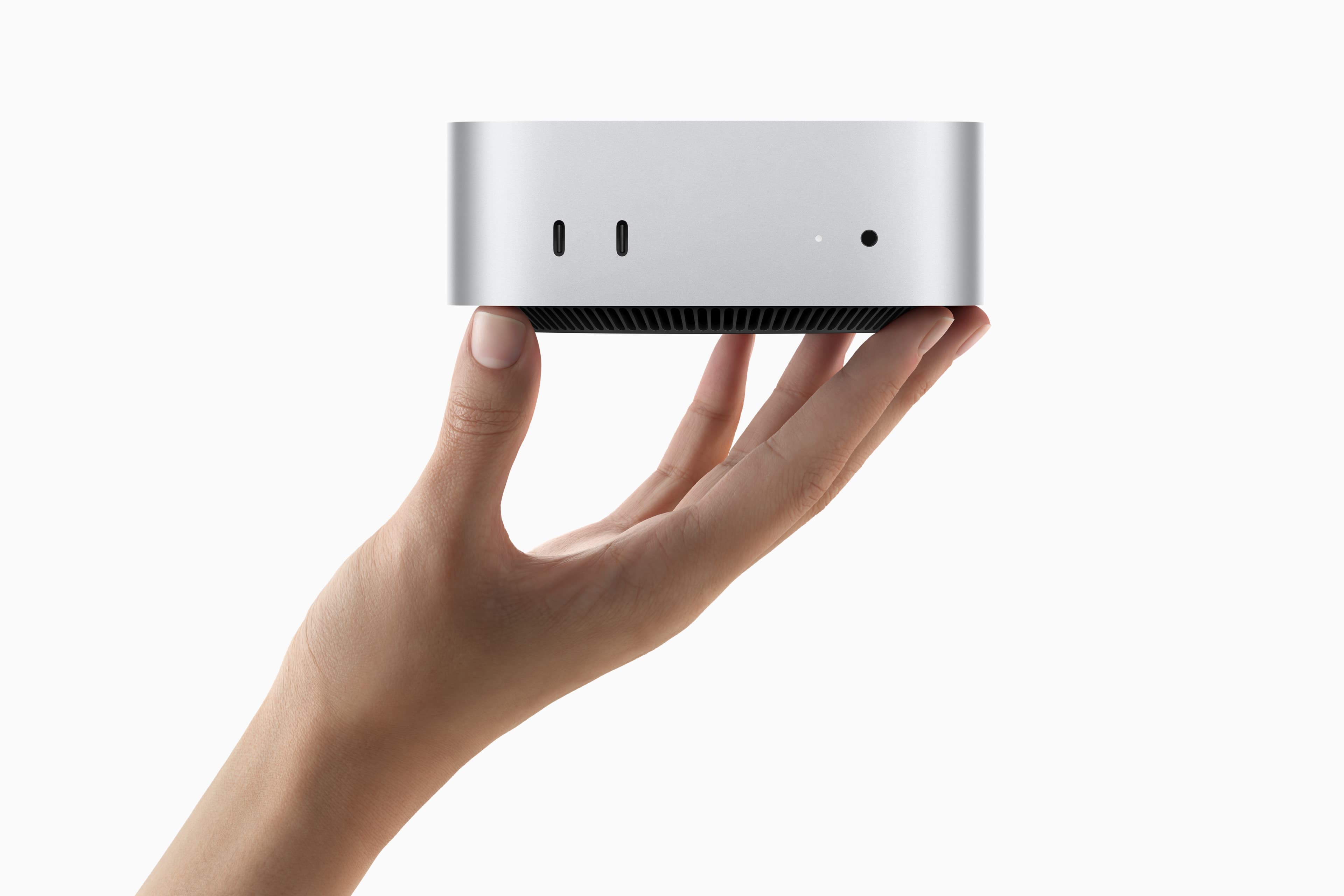
Apple Mac mini (M4)
"The best $799 value in computing, even if the power button is poorly placed."
Despite valid criticisms of Apple's locked-down hardware, the Mac mini M4 is undeniably the value king of 2026. The base M4 chip’s single-threaded performance is roughly 50% faster than anything Intel or AMD has at this price point. It just flies through browser tabs and Zoom calls without the fan ever spinning up.
Starting at $799 with 16GB of RAM as standard (finally!), it’s a highly capable 5x5 inch machine. Extensive testing proves it remains dead silent even during prolonged daily use. For those who don't need to play AAA games locally, this is the default recommendation for 90% of buyers.
However, the 'design' choices warrant scrutiny. Putting the power button on the bottom is a peak 'form over function' failure—requiring the machine to be literally tilted to turn it on. And since the SSD is soldered, buyers are stuck with that slow base 256GB drive unless they pay the upgrade premium. A smarter approach is buying a fast external NVMe enclosure and skipping the internal storage tiers entirely.
Evaluating Windows alternatives like the Geekom A9 Max and Asus NUC 15 Pro+ reveals that while they offer socketed RAM, socketed SSDs, and phenomenal port selection, there is a steep premium for those modular internals. Furthermore, under heavy load, they get significantly louder than the Apple hardware.
Ultimately, it comes down to the OS ecosystem and raw ergonomics. Yes, the bottom power button is absurd, and yes, the closed ecosystem is frustrating. But for standard office productivity, the Mac mini's performance-per-dollar ratio makes those flaws surprisingly easy to swallow.
Buy it if...
- ✓ you want M4 single-thread performance that is 50% ahead of x86 rivals
- ✓ you value completely silent operation for 99% of tasks
- ✓ you are looking for an incredible 5x5 inch footprint
Don't buy it if...
- ✕ you find a bottom-mounted power button to be a usability disaster
- ✕ you need a base SSD that is faster and larger than 256GB
- ✕ you require an internal upgrade path for RAM or storage
Technical Specifications
Beelink S12 Pro
"The $349 'good enough' machine that handles the basics better than expected."
For buyers seeking a computer that 'just works' for under $350, the Beelink S12 Pro is the definitive starting point. It uses the Intel N100, which is the gold standard for budget chips right now. It’s a 6-watt TDP part, but it runs Windows 11 Pro shockingly well for basic office work and 4K YouTube streaming.
At $349 at the time of writing, it includes 12GB of RAM and a 500GB SSD. That’s enough to handle a dozen Chrome tabs and a Word document without stuttering. It’s quiet, it’s tiny, and it’s significantly better than any $200 laptop found at a big-box store.
The shortcoming is obvious: this is a low-power machine. It is not suitable for editing 4K video, nor playing anything more demanding than Solitaire or basic 2D indie games. The multi-threaded performance is weak, so heavy background tasks will cause noticeable slowdowns. But as a secondary PC or a guest room machine, it's unbeatable.
For more headroom, generational upgrades like the Beelink Mini S13 offer DDR5. But realistically, for video editing or casual gaming, it's smarter to step up to the Ryzen-powered SER5 MAX for its substantial multi-threaded performance leap.
Exploring the secondary market reveals refurbished enterprise units (like Dell Optiplex and HP EliteDesk) for under $100. They excel at retro emulation up to the PS2 era, but for a hassle-free, modern Windows 11 experience out of the box, the Beelink S12 Pro is still the baseline to beat.
Buy it if...
- ✓ you want unbeatable value at ~$349 for a full Windows PC
- ✓ you need a machine shockingly capable for web browsing and 4K streaming
- ✓ you value low power draw and near-silent operation
Don't buy it if...
- ✕ you need high multi-threaded performance for heavy lifting
- ✕ you have gaming potential requirements outside of 2D/retro titles
- ✕ you plan to do content creation or video editing